
Charges
Loan charges let you attach origination fees, service fees, installment fees, late penalties, and other pricing elements to a loan. Embarc applies them automatically based on the charge setup, keeps outstanding balances separate from interest and principal, and exposes APIs so you can add, waive, adjust, or refund charges after origination.
Charge Lifecycle
flowchart TD
    A[Define charge, active & linked to product] --> B[Apply to loan automatically or manually]
    B --> C[Accrue & collect via repayments or direct charge payments]
    C --> D[Close out paid, waived, or adjusted]
    B --> E[Deactivate definition for new loans only]
Loan Charge Types
| Charge Time | Typical Use | Allowed Calculation Modes | Penalty Flag |
|---|---|---|---|
| DISBURSEMENT | Origination fee at initial draw | Flat, % of disbursement, % of total approved amount | Must be non-penalty |
| TRANCHE_DISBURSEMENT | Fee on additional drawdowns | Flat, % of disbursement | Must be non-penalty |
| SPECIFIED_DUE_DATE | Annual fee, closing fee, manual assessments | Flat, % of outstanding amount, % of principal+interest, % of interest | May be penalty or non-penalty |
| INSTALLMENT_FEE | Per-installment processing fee | Flat, % of principal due, % of interest | May be penalty or non-penalty |
| OVERDUE_INSTALLMENT | Late payment penalty | Flat, % of overdue amount | Must be penalty |
Caps – Percentage charges can include minCap and maxCap to lock amounts within a defined range.
Multi-disbursal nuance – Disbursement/tranche charges fire per drawdown; if you only want fees on later draws, use TRANCHE_DISBURSEMENT.
Dynamic schedules – Advanced payment allocation must include fee/penalty buckets so staged installments collect charges in the desired order.
How Charges Apply
Disbursement & Tranche Fees
- Trigger instantly during disbursement commands.
- Amount = base (initial or tranche amount) × configured percentage, capped if specified.
- Posted as loan transactions with the disbursement date. If the loan is never drawn, no fee is posted.
Specified Due Date Charges
- Agent (or automation) sets an explicit due date.
- Outstanding until a repayment covers it or a direct “waive charge” transaction is posted.
- Marked as
penalty=falsefor standard fees,truefor punitive fees.
Installment Fees
- Attached at product or loan level; Embarc generates one charge per installment.
- Percentage-based installment fees recalculate automatically whenever the schedule changes (interest recalculation, restructure, prepayment).
- Remain outstanding if the borrower pays less than the full installment; statements show overdue fees.
Overdue Penalties
- Scheduled job “Apply penalty to overdue loans” checks installments past due + wait period.
- Supports recurring penalties (weekly/daily) via
feeFrequencyand respects global configs (penalty-wait-period,backdate-penalties-enabled,grace-on-penalty-posting).
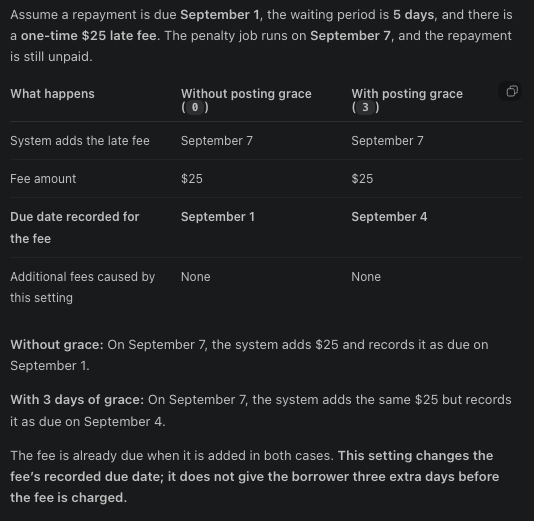
- Always marked as penalty; allocation rules typically treat them ahead of non-penalty fees.
Waivers, Adjustments, Refunds
- Waive removes the outstanding amount (useful for goodwill).
- Adjustment reduces the amount without reversing prior payments.
- Refund repays the borrower (requires payment details) and posts reversing accounting entries.
- Undo operations exist for each action if you need to revert.
Managing Charges
| Action | Endpoint | Notes |
|---|---|---|
| List charges on a loan | GET /loans/{loanId}/charges | Returns outstanding and fully paid/waived charges with status. |
| Add a charge | POST /loans/{loanId}/charges | Request body mirrors charge definition; specify due date for due-date charges. |
| Waive, adjust, refund | POST /loans/{loanId}/charges/{chargeId}?command=waive | Require locale/date fields if backdating refund adjustment |
| Inactivate a recurring charge | POST /v1/loans/{loanId}/charges/{chargeId}?command=inactivate | Allowed only for recurring specified-due-date charges not currently due. |
Permissions:READ_LOAN_CHARGES to view, CREATE_LOAN_CHARGES and EXECUTE_LOAN_CHARGE_TRANSACTIONS to add/pay/waive, plus role-based checks for adjustments/refunds.
Automation & Scheduling
- Penalty job: Run after COB/interest recalculation so overdue amounts are up to date.
- COB / Interest recalculation: Recomputes installments; ensure it runs before posting penalty jobs or final payoff transactions on Interest recalculation enabled products.
Configuration Tips
- Penalty flag – Required for overdue charges; prohibited for disbursement/tranche charges. Double-check when creating definitions.
- Caps and percentages – Set sensible caps to avoid unexpectedly high fees on large loans.
- Multi-draw products – Pair disbursement and tranche charges carefully if you only want fees on certain draws.
- Dynamic schedule products – Review advanced payment allocation to ensure charges are collected at the right stage; note that down payments do not trigger disbursement charges.
Updated 22 days ago